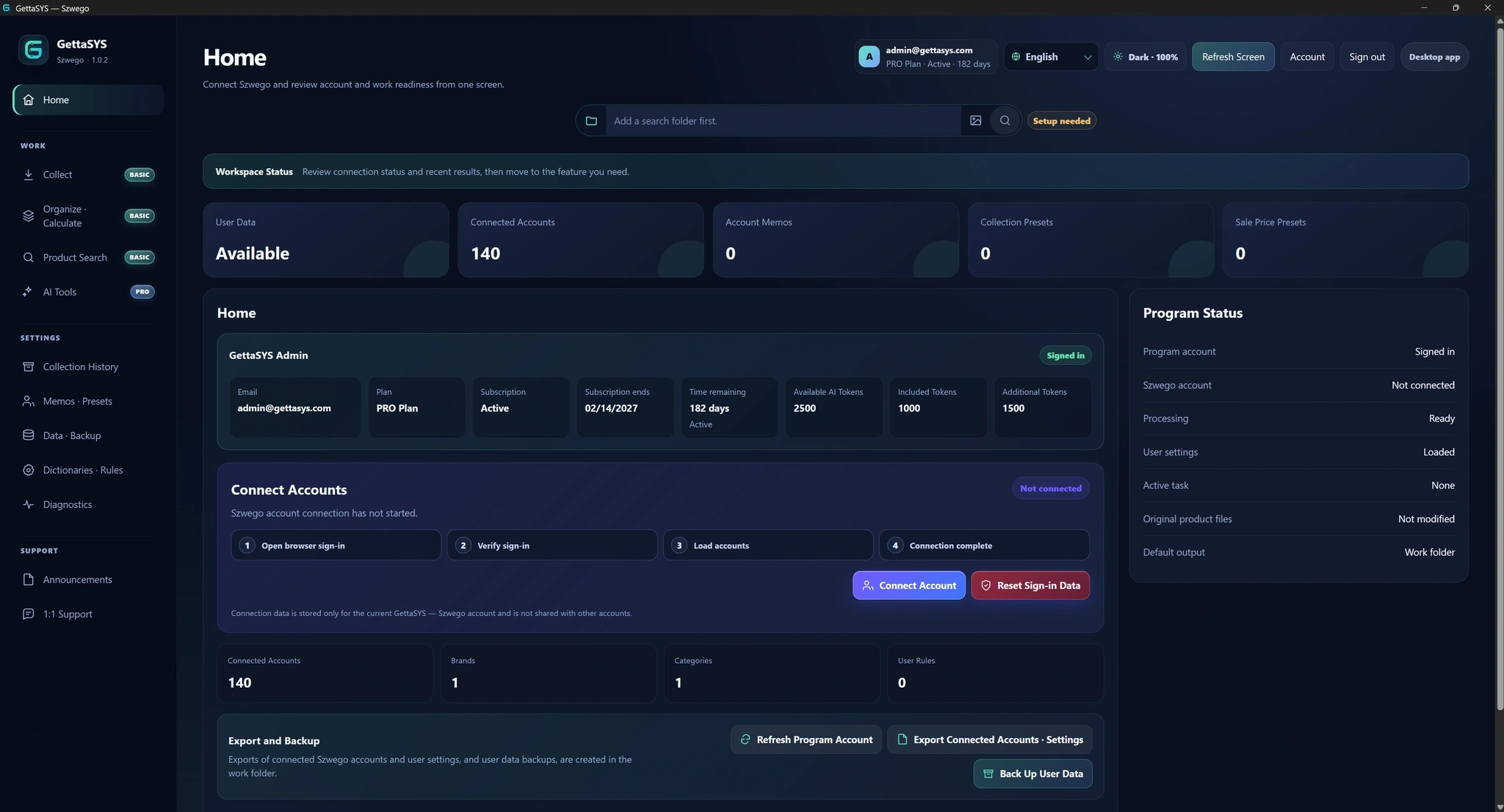
From product collectionto sales preparation,all in GettaSYS.
Quickly collect Szwego products using a range of filters,then organize images, descriptions and prices.Search for the products you need and prepare sales materials in multiple languages, all in GettaSYS.
3-day free trial · No card required · No automatic paid upgrade
✓Try it without registering a payment method
✓Windows 64-bit
✓한국어 · English · 日本語 · Tiếng Việt
✓One PC
GettaSYS is independently provided software and is not an official or affiliated service of Szwego.
Example application screen
01Collect by product
02Organize product details and prices
03Search and manage products
01 · Everyday use cases
A smart solution to dramatically reduceproduct collection time and management costs
Choose a familiar task to see the steps and the materials you can prepare.
BASICPRO
Turn new arrivals into organized sales materials
Connect the work of saving photos, arranging descriptions and calculating prices in a single workflow.
1
Collect what you need
Choose accounts, dates, keywords and categories.
2
Apply your rules
Use your brand and category dictionaries, tidy descriptions and calculate selling prices.
3
Review the result
Check images and details in product management, then prepare the final CSV.
BASICPRO
Find the product a customer asks about
Search your registered product materials using text or a reference image instead of opening folders one by one.
1
Start with a reference
Enter a word or provide an image.
2
Compare the results
Look through matching images and select the product.
3
Use the details
View or copy information in different languages, or open the product folder.
PROAI tools
Prepare descriptions for the markets you sell to
Choose products and a language, use AI to help with descriptions and titles, then review the result.
1
Choose your products
Work on all materials or a selected set of products.
2
Check language and usage
Choose Korean, English, Japanese or Vietnamese and review the token estimate.
3
Review what was created
Check the descriptions and titles and edit anything that needs attention.
02 · Features
Choose the tools your work needs.
Collect, organize, manage and search with BASIC. Choose PRO when you also need AI assistance.
BASICPRO
Collection
Collect the products you need
Choose accounts and collection conditions,then save images, videos and original information to your PC.
Collection and saving options
Filter by date, keyword, media and category
Set extra conditions such as a minimum image count
Reuse saved media and advanced settings, called presets
Presets make repeated tasks easier.
BASICPRO
Organize & calculate
Keep details and prices consistent
Set rules for descriptions and categories,then calculate selling prices from your costs.
How to organize and calculate prices
Apply your saved brand/category lists (dictionaries) and text rules
Set exchange rates, margins, shipping costs and rounding
Prepare KRW, USD, JPY and VND selling prices
Apply the same working rules across multiple products.
BASICPRO
Product management
Fill in incomplete product information
View photos and product information together,then select specific products to edit.
How to review and edit products
Find products with missing or empty information files
Change the main image and image order
Edit language-specific details and manage review status in bulk
See the products that need review before you use them for sales.
BASICPRO
Product search
Search with specific keywords or images
Search the materials collected on your PC and check the information you need.
Text and image search options
Search with text or a reference image
Compare images in the results
View and copy language-specific details or open the folder
Find useful materials when answering product enquiries.
PRO
AI tools
Use AI where you need it
Four AI tools help generate descriptions and product titles,and match brands and categories.
AI tools and usage options
Prepare Korean, English, Japanese and Vietnamese output
Choose all products or a selected set
Review estimated token use before running
Choose the scope yourself and review the completed results.
Storage & backup
Keep your materials on your PC
Find collected materials and work results in your chosen folders and back up important data.
How to save and back up
Keep images and information organized by product
Use product files and CSV results
Back up and restore important settings and data
Online features such as AI send the materials needed for processing when you run them.
03 · Your results
Turn collected materials into resources for your sales.
Work with product folders, information in different languages and review tables.Check the content, then prepare it for the format your store requires.
01
Product images and videos
Open a product folder to check photos and original materials.
02
Information by language
View descriptions, titles, brands, categories and prices, and use the details you need.
03
Review and finish with product tables (CSV)
Review multiple products in a table, apply changes and check final results.CSV is a table file you can open in Excel and similar apps.
GettaSYS does not automatically publish listings to stores. Check your store's upload format before using the materials.
Take a look inside
Example screens. Menus and layout may vary with the installed version.
04 · Pricing
Choose a plan for the work ahead.
Start with a free trial to try the collection process.Choose BASIC for everyday product work, or PRO when you also need AI assistance.
Monthly subscription · Tax included · 1 PC per account
Choose in the application after installingCreate an account, verify your email and phone, then sign in. Open subscription management to choose the trial or a paid plan.
Free Trial
To test the collection process on your own PC first
✓Additional AI tokens available · included tokens do not roll over
Pricing
Displayed prices are for the United States (USD). Before checkout, choose KRW, USD, JPY or VND as your payment currency. Review the final amount based on your actual billing details and applicable tax in checkout.
Free trial
The application shows your trial collection date range and account limit.You can also try organizing, price calculation and product search.AI execution requires PRO.
AI tokens
AI tokens measure AI task usage.See Using AI in the FAQ below for details of when tokens are deducted.
A refund request may be submitted for every paid GettaSYS transaction processed by Paddle within 14 days of the transaction date or monthly renewal charge.
Submitting within 14 days does not mean automatic approval or a guaranteed full refund.Applicable law, Paddle policy, the reason, and service or AI token usage are reviewed case by case.See the Refund Policy for details. Refund Policy
05 · How it works
For your first test,collect a short date range.
Install, connect an account and try a short date range so you can check the saved results first.
1
Download and install
Run the Windows installer and follow the on-screen instructions.Required components are prepared during setup.
2
Create an account and check your trial
Verify your email and phone, then sign in.Check your trial status and available period in subscription management.
3
Connect Szwego and choose a folder
Connect a Szwego account you are authorized to use, then choose where to save product materials.
4
Run a test collection and check the results
Begin with one account or a short date range.Check the saved images and descriptions before expanding the scope.
You can also explore organizing, price calculation and product search during the trial.Choose BASIC or PRO to keep using them.AI tasks require PRO. Reuse your dictionaries and pricing rules in later work.
06 · FAQ
Questions you may have before starting
Find answers by topic, from installation to everyday product work.
Getting started
The 3-day trial includes collection, organizing, price calculation and product search. No payment card or automatic paid upgrade is required. Check the application for collection date and account limits. AI execution requires PRO.
No. The three-day free trial does not require a payment method and does not automatically convert to a paid subscription.
Yes. Complete both email and SMS verification to protect the account and confirm normal use of the free trial.
The application, installer, updates and website support Korean, English, Japanese and Vietnamese. AI results are saved as language-specific files. Product Management and Search let you choose which files to display and their order.
Internet access is required for sign-in, account-status checks, Subscription Management, AI, and some online features. Protection is provided for temporary network interruptions.
All plans use a one-PC policy. Use the PC-change process in the application when moving to another computer.
No. GettaSYS is independently provided software and is not an official or affiliated Szwego service.
Use the in-app support request or email support@gettasys.com for help with accounts, features, subscriptions, billing, or privacy.
Product work
Yes. BASIC includes collection, dictionary and rule-based organization, price calculation, product management and search, and review/final CSV files. Choose PRO to add AI descriptions and titles or AI-assisted brand and category matching.
GettaSYS collects and organizes product images, descriptions and prices to help prepare sales materials. It does not automatically publish store listings. Review the final materials and adapt them to your store's upload format.
Product filters find products by whether information files exist and contain text. Match any or all of your selected conditions. File display settings only control which details appear for the selected product and their order. Both features are available in BASIC.
No. Add, duplicate, edit or delete entries and turn them on or off in the application. For many entries, import a CSV or paste an Excel table, review the data and save. Each tab includes instructions and examples.
Saved settings apply to future tasks. Saving settings alone does not change existing product files. The previous settings are backed up before saving. A missing language value is not filled with another language.
File display settings do not delete files. Deleting an individual information file in Product Management moves that file directly to the Windows Recycle Bin. The product identifier file goods_id.txt cannot be deleted. Moving an entire product to the Recycle Bin also moves its images and information files.
Ordinary collection results and work data are stored on your PC or selected folders. Online features you explicitly use, such as AI, may transmit only the minimum data needed for processing.
No. Uninstalling does not automatically delete collection results, images, videos, product information, notes, presets, dictionaries, rules, calculation results, or CSV files in your selected work folders. You manage backup and deletion of those files.
Only process accounts and materials that you own or are legitimately authorized to use.
Using AI
No. With PRO, send selected products to AI Tools, then review the task, language and scope before running it. Brand and category tasks first check your dictionaries. Review the token estimate before execution. Selecting products or opening AI Tools does not deduct tokens.
For brand and category tasks, complete your dictionary candidates and their values in the selected language first. The task will not run if dictionary checks fail. AI judges the registered candidates and records a reason when none fits.
Selecting a scope and checking the estimate are free. Each normally completed product/task costs 1 token. A valid brand or category judgment of “no match” or “insufficient evidence” also costs 1 token. Technical failures such as server or network errors, and unprocessed items, are not charged.
Missing-file mode processes products without the result file for the selected task and language; an empty file still counts as present. Regenerate-all mode makes a new judgment for every product, whether a file exists or not, and refreshes results. Both charge for normal completion. A new run does not reuse previous successful results for free.
The reason is recorded in the results CSV. No new brand or category file is created for that language, and any existing file is kept. After you improve the dictionary, normal completion in a new run is charged again.
Subscriptions & payments
BASIC includes Collection, Organize & Calculate, Product Management, review/final CSV and Product Search. PRO adds four AI tools and 1,000 included AI tokens each month.
Sign in to GettaSYS and choose BASIC or PRO from Subscription Management. A secure checkout linked to the signed-in account and selected plan opens.
BASIC and PRO can use Collection without a separate daily collection-count limit during the subscription. The one-PC policy, network conditions, connected-account status, and normal-use rules still apply.
No. Cancellation takes effect at the end of the current billing period. Access continues until then, and automatic billing stops from the next renewal.
AI Tools are exclusive to PRO. Each successful PRO renewal includes 1,000 AI tokens. Unused included tokens do not roll over, and additional purchased tokens are managed separately.
Secure checkout shows cards or express payment methods eligible for the customer’s country, currency, device, browser, and monthly subscription. Availability may vary at checkout.
Open the customer portal from Subscription Management in the application to view receipts and update the payment method.
A refund request may be submitted for an initial subscription payment, each monthly renewal charge, and each AI token pack purchase within 14 days of that transaction. Requests are not automatically approved and may result in a full refund, a partial refund for the unused portion, or a decline after review of applicable law, Paddle policy, the reason, and usage. See the Refund Policy for details. Refund Policy
07 · Policies
Before you get started
Review plan changes, payment currencies, cancellation and refunds. The Refund Policy also explains card issuer fees and the amount you receive.